
ApiCatcher for Android
Making Android HTTP/HTTPS packet capture and debugging simpler
Built on VpnService + tun2proxy, ApiCatcher force-redirects HTTP/HTTPS traffic at the VPN tunnel layer—transparent to apps and independent of system proxy settings. Aligned with the iOS core architecture for a clean mobile capture experience.
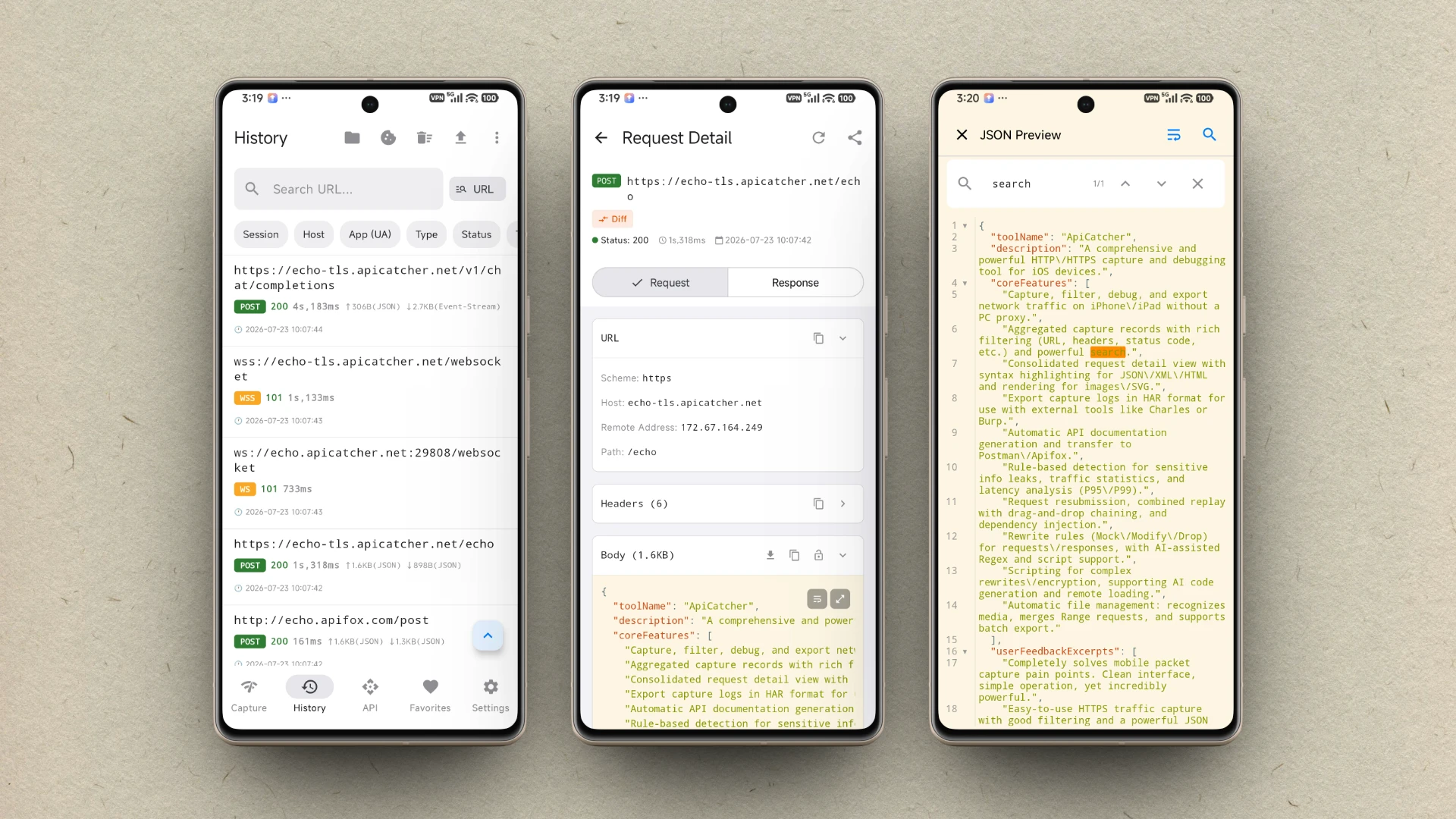
Professional Packet Capture & API Debugging Tool
Comprehensive network request capture, Mock rewriting, AI scripting, and request replay—all in one efficient network debugging service.
Capture HTTPS Traffic
Directly capture and analyze HTTPS requests and responses on your Android device.
Capture WebSocket Traffic
Support capturing WS/WSS traffic and displaying data frames as a chat message list.
Allow/Deny Host List
Configure Host allow/deny lists to filter requests and avoid capturing traffic from other applications.
Request Replay
Replay requests with a single tap to quickly reproduce and verify issues.
Combined Replay
Drag and drop to combine multiple requests, supporting dependent parameter injection and sequential execution.
Request Rewrite
Supports Mock, modification, dropping, and other rewrite behaviors to cover common debugging needs.
Execute Scripts
Provides scripting capabilities for complex rewrites and encryption algorithms, with rapid testing.
Scheduled Request Replay
Supports triggering replays on a schedule to assist automated testing and regression verification.
Export Requests
Supports exporting request records for easy sharing and reproduction.
Export API
Automatically generates API documentation, exportable to Postman / Apifox.
Export Image/Video/Audio
Automatically identifies and extracts media requests, supporting merging of segmented downloads.
API Scanning
Rule-based detection and statistics from captured traffic, supporting custom scanning rules.
DNS Mapping
Define custom DNS resolution rules to map domain names to specific IP addresses.
Protobuf Decode
Automatically decode Protobuf-encoded request or response Body.
Clean, Easy-to-Use Android Network Capture & Debugging Experience
Empowering Android developers to efficiently locate and analyze HTTP and WebSocket traffic.
No Desktop Proxy Required
Stop reconfiguring Wi‑Fi or cellular proxy settings for every debug session. Start capture with one tap directly on your Android device.
Full-Traffic TUN Transparent Capture
Creates a TUN virtual NIC via VpnService and transparently forwards HTTP/HTTPS connections to a local MITM proxy through tun2proxy.
HTTPS Man-in-the-Middle Decryption
A local Netty-based MITM proxy decrypts HTTPS via CONNECT tunnels and dynamic certificate issuance, while forwarding and recording HTTP traffic directly.
Extremely Simple and Intuitive Interaction Design
A clean UI aligned with the iOS experience. Request and response details at a glance, making traffic analysis more efficient.
Android Packet Capture Guide & Limitations
Understand how it works, CA installation, and HTTPS capture limits to get started quickly
1How It Works
1. Create VPN / TUN Virtual NIC
When capture starts, ApiCatcher creates a VpnService and captures all IP packets on the device through a TUN virtual network interface.
2. Transparent Forwarding via tun2proxy
tun2proxy (a Rust native library) parses TCP packets at a low level and transparently forwards HTTP/HTTPS connections to local 127.0.0.1:8888.
3. Local MITM Proxy Decryption
A local Netty-based MITM proxy forwards and records HTTP traffic directly, and decrypts HTTPS via CONNECT tunnels plus dynamic certificate issuance. Transparent to apps and independent of system proxy settings.
2CA Certificate Installation Guide
Capturing HTTPS traffic requires installing the ApiCatcher CA certificate first. Because Android 14+ (API ≥ 34) no longer allows apps to install CA certificates directly, please download and install manually as follows:
- Tap “Install CA Certificate” in the app; the certificate is saved to the Downloads folder.
- Go to Settings → Security & privacy → More security & privacy → Encryption & credentials → Install a certificate → CA certificate.
- Select the Downloads/apicatcher_ca.crt file.
- Enter your lock-screen password to confirm installation.
- Go to Settings → Security & privacy → More security & privacy → Encryption & credentials → Trusted credentials → User, find the certificate named ApiCatcher CA, and tap Trust.
MITM does not bypass SSL Pinning. Even with the CA installed, apps with certificate pinning (e.g. many Google apps) cannot be decrypted.
3Limitations of Capturing and Debugging HTTPS Traffic
Certificates can usually only be installed in the User credential store. On Android 7 and above, most apps do not trust user certificates, so their HTTPS traffic cannot be decrypted.
✓Website Debugging
Browsers such as Chrome typically trust user certificates and can capture web traffic normally. If you are debugging web browsing, we recommend using Chrome.
⚠App Debugging
To capture and decrypt traffic from your own app, configure your project to trust user certificates. See “How Developers Capture Their Own App Traffic” below for configuration details.
4How Developers Capture Their Own App Traffic
1. Capture HTTP Requests
If your app uses the default networking stack, simply enable the ApiCatcher VPN—no extra configuration is needed.
2. Capture HTTPS Requests
On Android 7.0 (API 24)+, the system trusts only system CA certificates by default, not user-installed ones. Developers must declare trust for user CAs in their app, or HTTPS handshakes will fail.
Create network_security_config.xml under res/xml/:
<?xml version="1.0" encoding="utf-8"?>
<network-security-config>
    <debug-overrides>
        <trust-anchors>
            <certificates src="user"/>
            <certificates src="system"/>
        </trust-anchors>
    </debug-overrides>
</network-security-config>
Then reference it on the application tag in AndroidManifest.xml:
<application
    android:networkSecurityConfig="@xml/network_security_config"
    ...>
</application>
This only takes effect in debug builds; release builds are unaffected. After installing the ApiCatcher CA and enabling VPN, you can capture your app’s own HTTPS traffic.