
Combo Replay Upgrade: Batch-Test the Same API with Different Parameters
There is a common but tedious need in API debugging: run the same endpoint with many different parameter sets — happy path, edge cases, invalid input — and compare the responses side by side.
Previously, that meant digging through capture history, tweaking parameters by hand, hitting replay, noting the result, and repeating for each case. Combo Replay was built for orchestrating multiple requests, but in practice it still fell short of smooth "batch testing one API." This update closes that gap.
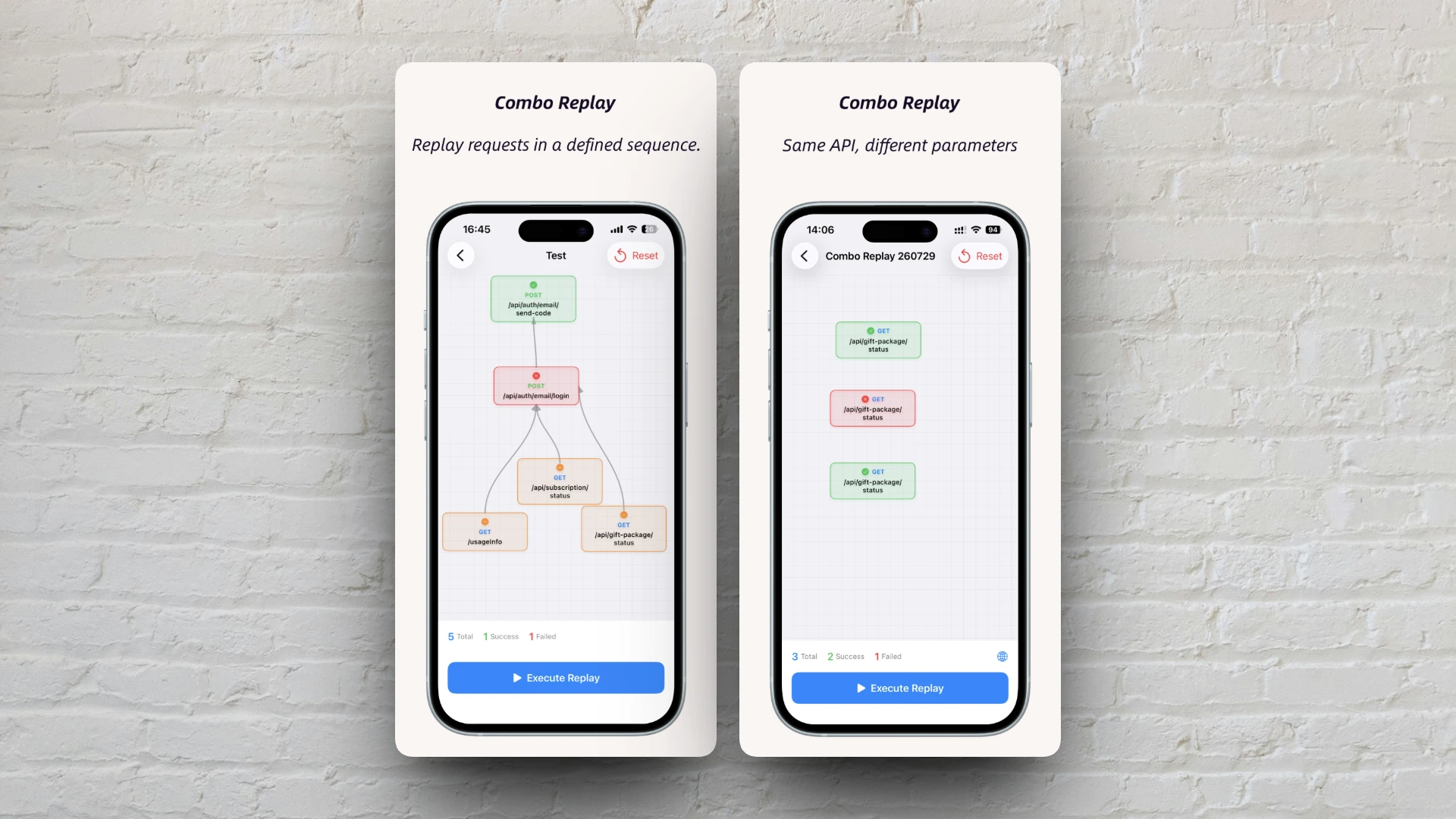
What This Update Addresses
Combo Replay lets you arrange multiple HTTP/HTTPS requests into a single flow that runs in parallel or in sequence based on dependencies. It serves two main use cases:
- Chained integration — log in first, then call business APIs with the token (dependency injection)
- Batch validation — hit the same endpoint with different inputs and run them all at once (parallel replay)
The second scenario is everywhere in testing, yet it used to feel awkward. This release adds three improvements focused on that workflow.
Improvement 1: Add the Same API Multiple Times
Earlier versions blocked adding the same captured request more than once — a guard against mistakes, but also a blocker for legitimate "same endpoint, multiple cases" testing.
That restriction is gone. You can add POST /api/order three times for normal checkout, out-of-stock, and invalid amount scenarios. With no dependencies between them, all three nodes run in parallel. When execution finishes, compare success/failure status across nodes at a glance.
POST /api/order  Node 1  →  body: {"amount": 100, "type": "normal"}
POST /api/order  Node 2  →  body: {"amount": 0,   "type": "edge"}
POST /api/order  Node 3  →  body: {"amount": -1,  "type": "invalid"}
(no dependencies → parallel execution)
When order matters — e.g. login before calling a business API — use Set Dependency to run nodes sequentially, same as before.
Improvement 2: Preset Parameters While Editing Rules
Three nodes for the same API — how do you set different parameters for each? Tweaking them on the execution page every time means nothing sticks as a reusable test case.
When editing a Combo Replay rule, the node menu now includes Preset Parameters. Configure query params, headers, and body independently per node. Save the rule and those values persist the next time you open it.
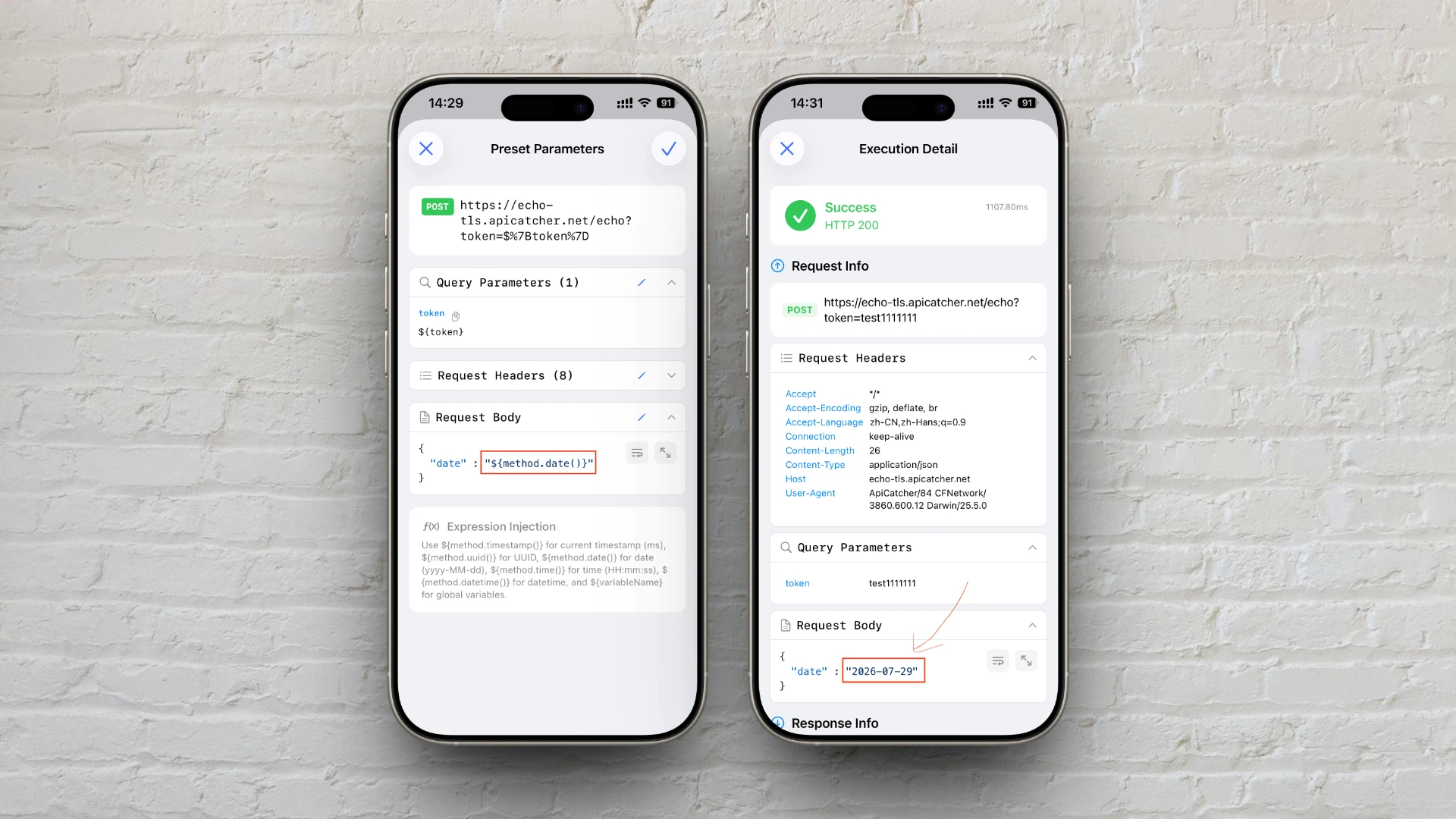
The preset editor matches the execution page's "Modify Request" UI. The difference is when values apply:
| Preset Parameters (edit page) | Modify Request (execution page) | |
|---|---|---|
| Entry | Node menu → Preset Parameters | Tap node on execution page |
| Persistence | Saved to the rule | This run only, not written back |
| Use case | Fixed test cases | Quick tweaks before a run |
Improvement 3: Expression Injection for Dynamic Values
Some values cannot be hard-coded — timestamps must be current, request IDs need UUIDs, and tokens should be shared across nodes without editing each one separately.
Expression injection is new. In query params, headers, or body, use ${...} syntax; values are replaced automatically when you run the replay.
Built-in methods:
| Expression | Result |
|---|---|
${method.timestamp()} | Current timestamp (milliseconds) |
${method.uuid()} | UUID (lowercase) |
${method.date()} | Today's date, e.g. 2026-07-29 |
${method.time()} | Current time, e.g. 14:30:00 |
${method.datetime()} | Date and time, e.g. 2026-07-29 14:30:00 |
Global variables:
Expressions like ${token} or ${appId} (anything not starting with method.) are global variables. When a rule uses them, a 🌐 button appears on the right side of the execution page status bar (the row showing total nodes / success / failure). Tap it to set values; they are persisted with the rule until the rule is deleted.
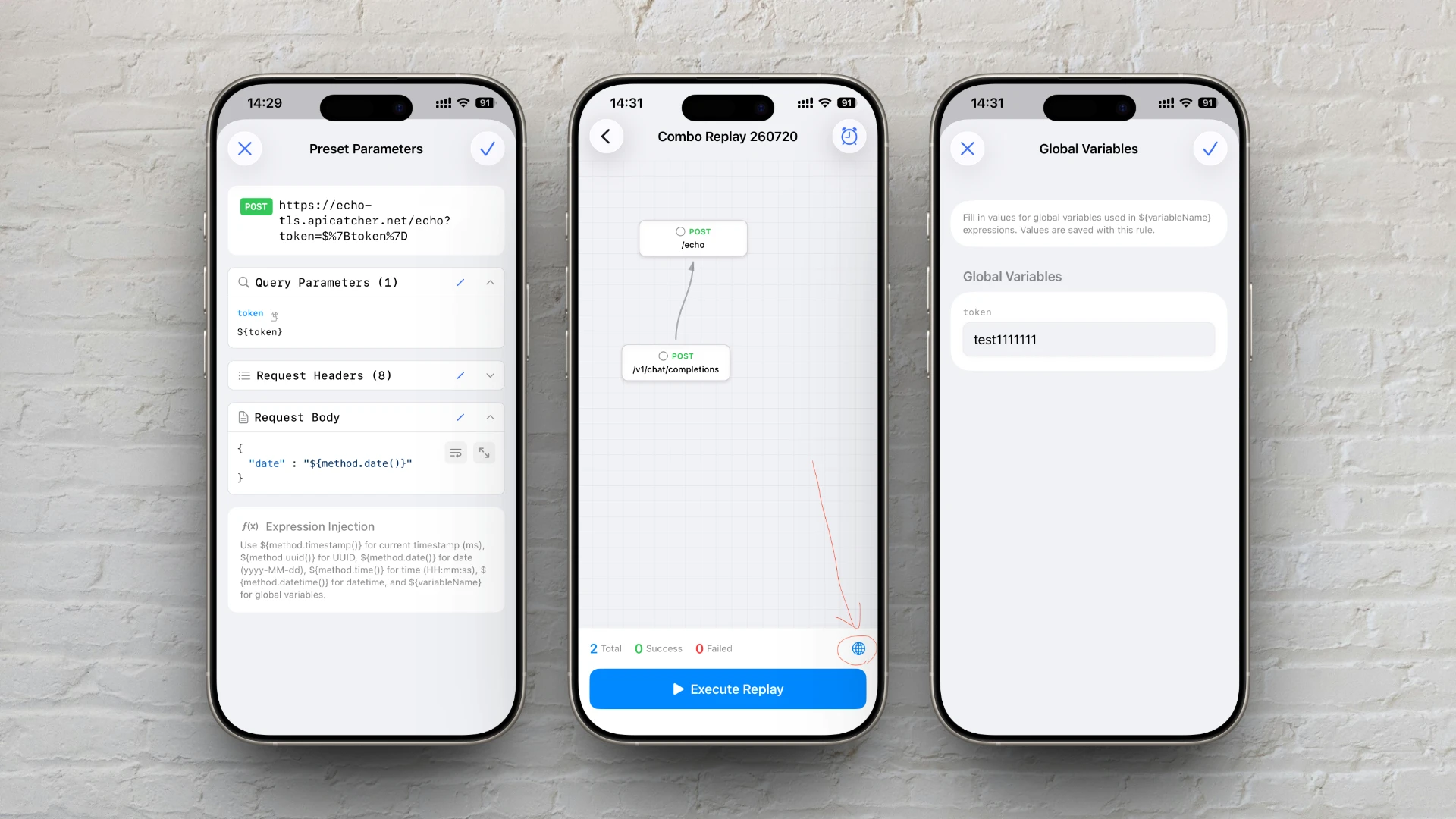
Expression injection works in both Preset Parameters and Modify Request. Example:
Header:  X-Request-Id: ${method.uuid()}
Query:   ts=${method.timestamp()}
Body:    {"token": "${token}", "userId": "123"}
Set token via 🌐 before running; timestamp and UUID regenerate on each execution.
Parameter Processing Order
When preset parameters, expression injection, and dependency injection are all in play, requests are built in this order before send:
Preset parameters / Modify Request
        ↓
   Expression injection (${method.timestamp()}, etc.)
        ↓
   Dependency injection (parameter mapping)
        ↓
     Send HTTP request
End-to-End Example
Testing three login inputs:
- Open Combo Replay and create a rule
- Add
POST /api/loginthree times from capture history - Set preset parameters on each node (valid account / wrong password / empty password)
- No dependencies → save the rule
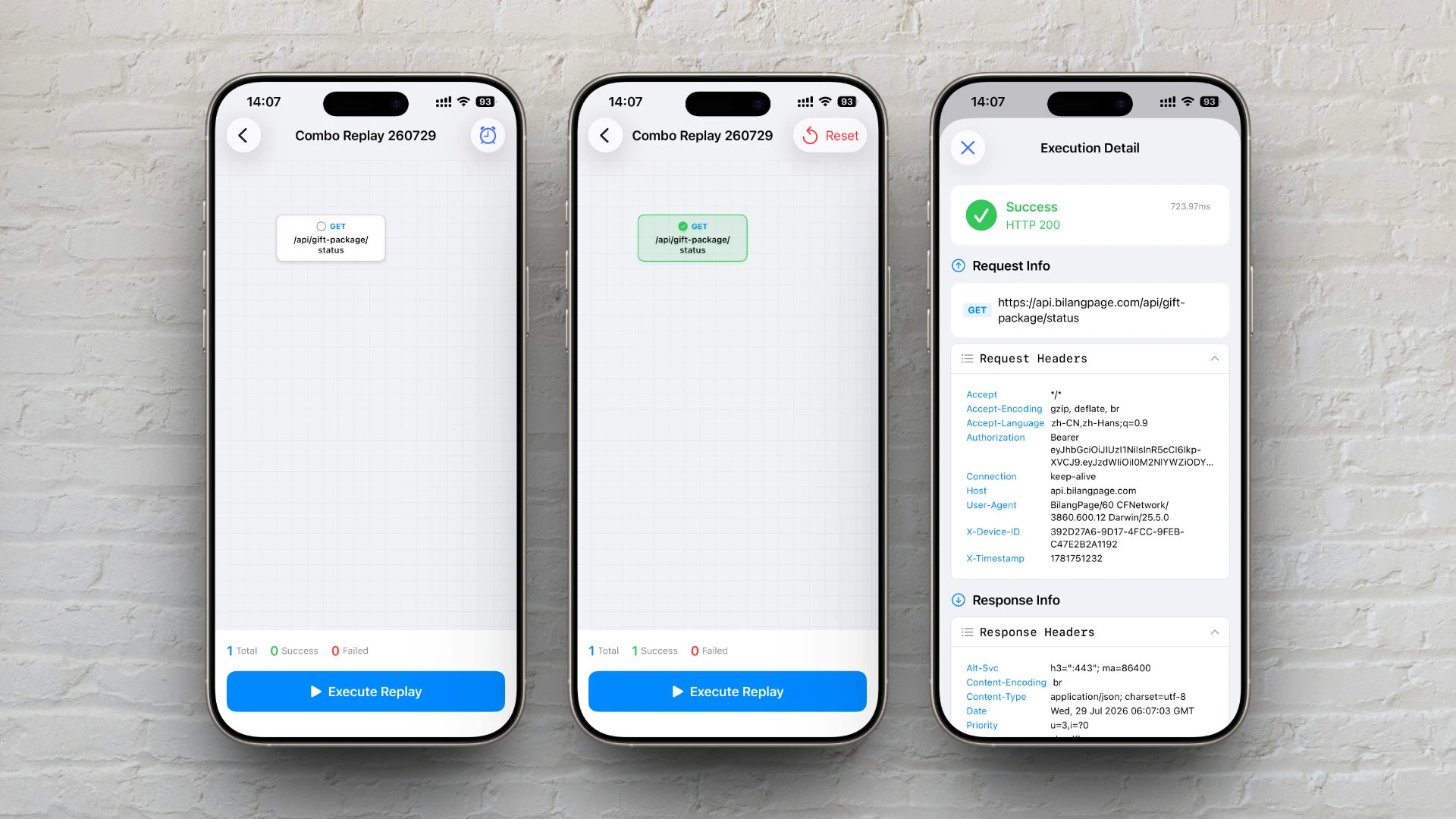
- Open the execution page and tap Run Replay
- After execution, tap each node to inspect request/response details
For a dynamic requestId, add "requestId": "${method.uuid()}" to the body — no manual entry each time.
Working Alongside Dependency Injection
This update targets same-API batch testing. Dependency injection is unchanged — still the right tool for login chains and passing values between upstream and downstream requests. Use both: parallel nodes for boundary inputs, sequential nodes for business flows, expressions for dynamic values, dependency injection or global variables for tokens.
For step-by-step instructions, dependency rules, and FAQs, see the Combo Replay guide.
Version Requirements
- iOS: >= 3.13
- Android: >= 1.2.0
- macOS/Windows: not supported yet
If you already use Combo Replay for integration testing, this upgrade should cut down a lot of repetitive manual parameter edits. Give it a try — we'd love your feedback.