
Why Did We Build ApiCatcher?
Hi, I'm Wu Jiuye, the creator of ApiCatcher. My background includes iOS & Android app development, backend engineering, and middleware R&D. I built ChatTCP in 2024, resigned to start my own venture in December 2025, and created ApiCatcher in January 2026. Today I'd like to share why we developed this HTTPS debugging tool.
Throughout my career, every time I switched jobs I had to deal with unfamiliar codebases that basically had no technical documentation or API docs. Whenever I was assigned a task to modify a feature, I had to spend a lot of time reading code just to figure out which APIs were involved.
In 2025, I transitioned from middleware development to backend development and started working on business requirements. One particular feature development stands out in my memory: I didn't have access to the client-side code, didn't know which APIs the client was calling, and the client-side colleagues had also just joined and weren't familiar with the project. I had to find a new way to identify the APIs I needed — without documentation and without code access.
I could have captured packets on the server side, but the server architecture was too complex and I didn't even know which gateway was the entry point. The only option was to capture packets on the client side, but the client was making HTTPS requests. So I looked for an HTTPS debugging proxy. Since my phone is an iPhone, I tried several HTTPS capture tools from the App Store, including Stream and ProxyPin.
What I really wanted was to import those APIs into Apifox, then modify them based on the new iteration requirements, and share the updated API docs with the team. The open-source tools basically only offered packet capture as a single feature. I tried some paid tools too, but none solved my needs. In the end, I had to manually write out the APIs in Apifox based on the captured request and response data — it took me a full day and a half.
I needed to reproduce multiple business scenarios, capture requests multiple times, and merge the parameters, request bodies, and response bodies from those captures into a reasonably complete API document. That's because the API receives different parameters and returns different responses depending on the scenario. For example, when signing for an order where the device type is a camera, certain camera-related parameters are needed; when the device type is an electronic key, key-related parameters are needed instead. The differences in response fields across scenarios, combined with lots of if-else logic in the backend code, made understanding it from code level extremely painful.
After that experience, I decided to build my own HTTPS debugging proxy — one that could automatically generate API documentation, automatically update the docs by merging fields from multiple captures of the same API, and automatically associate capture history. Most importantly, it would be able to export the generated API docs to Apifox or Postman, along with the request history as test cases. That way, I could analyze and iterate on the API docs in Apifox based on real data and share them with the team.
Auto-generating API docs from captured HTTPS requests, updating them, turning captured request history from different scenarios into test cases, and exporting both docs and cases to Apifox or Postman — that was the core vision for this tool. It's also an original, unique feature among all debugging proxy tools. And that's why we named it ApiCatcher.
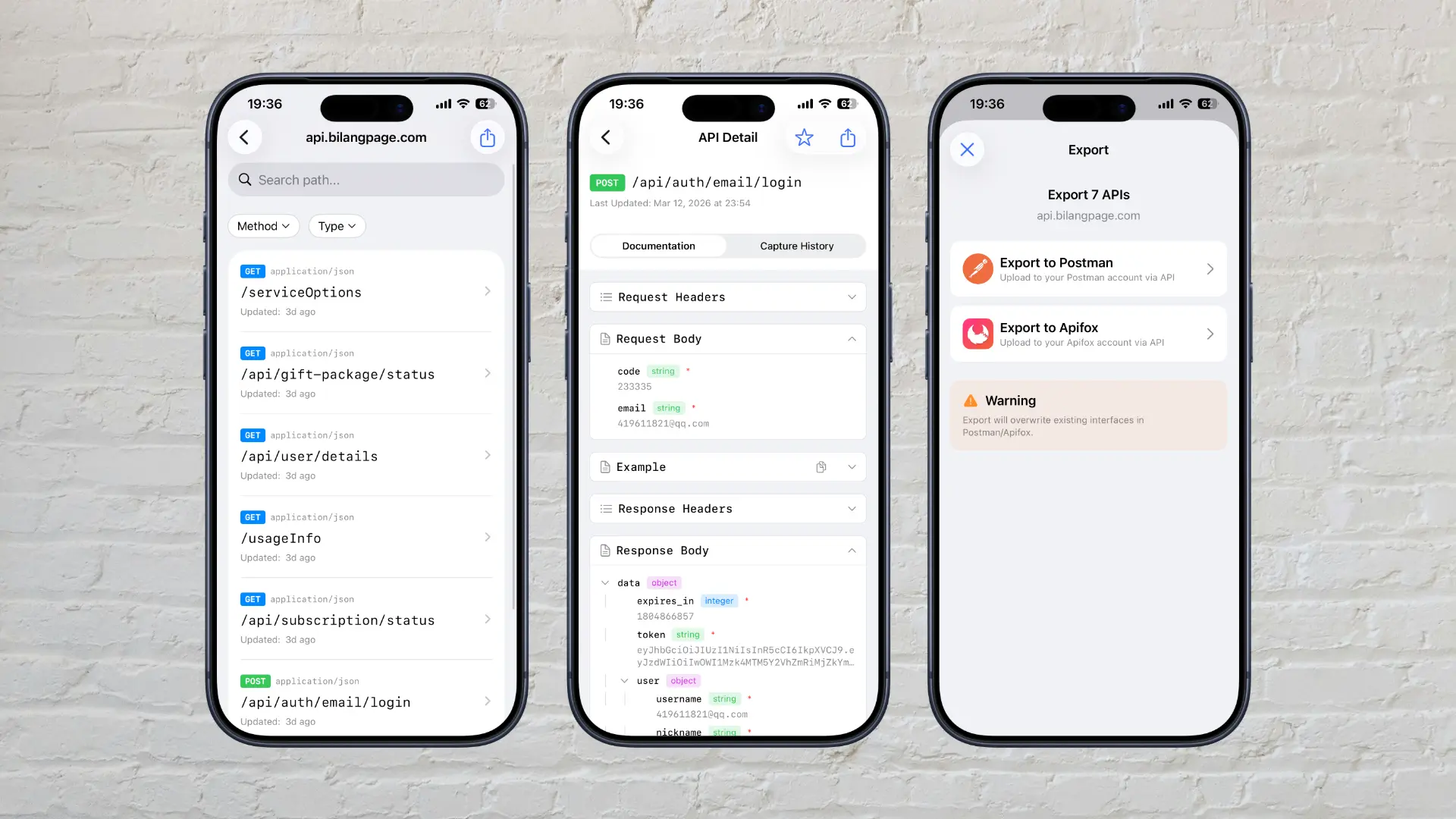
Later, while doing full-stack development for my own projects, I realized that for frontend and client developers (web, iOS, Android, Windows, macOS), a debugging proxy is not just about capturing packets — it's a powerful tool for API debugging. As a backend developer, I used to test APIs with API management tools or by writing test cases, just verifying the responses matched expectations. But client-side development is different: you need to verify UI interaction logic, which scripts can't replace — you need to manually interact and observe the results. The only option for clients was to mock responses in code, but that leads to tons of mock code that's extremely hard to maintain. A debugging proxy that supports mock responses and simulated latency could solve this pain point. Additionally, during frontend-backend integration, a debugging proxy is incredibly helpful for diagnosing issues — much faster than logging both sides, since the underlying network framework can alter what's actually sent.
Combining HTTPS packet capture and API debugging into one tool made perfect sense.
On top of that, we wanted to create a tool that prioritizes user experience, not just a feature checklist. We've paid attention to many details. For example, when writing regex replacement rules, the syntax can be complex — so we added an AI-powered regex generator where you simply describe the effect and AI writes the expression. Similarly for cron expressions in scheduled tasks, we added AI generation as well.
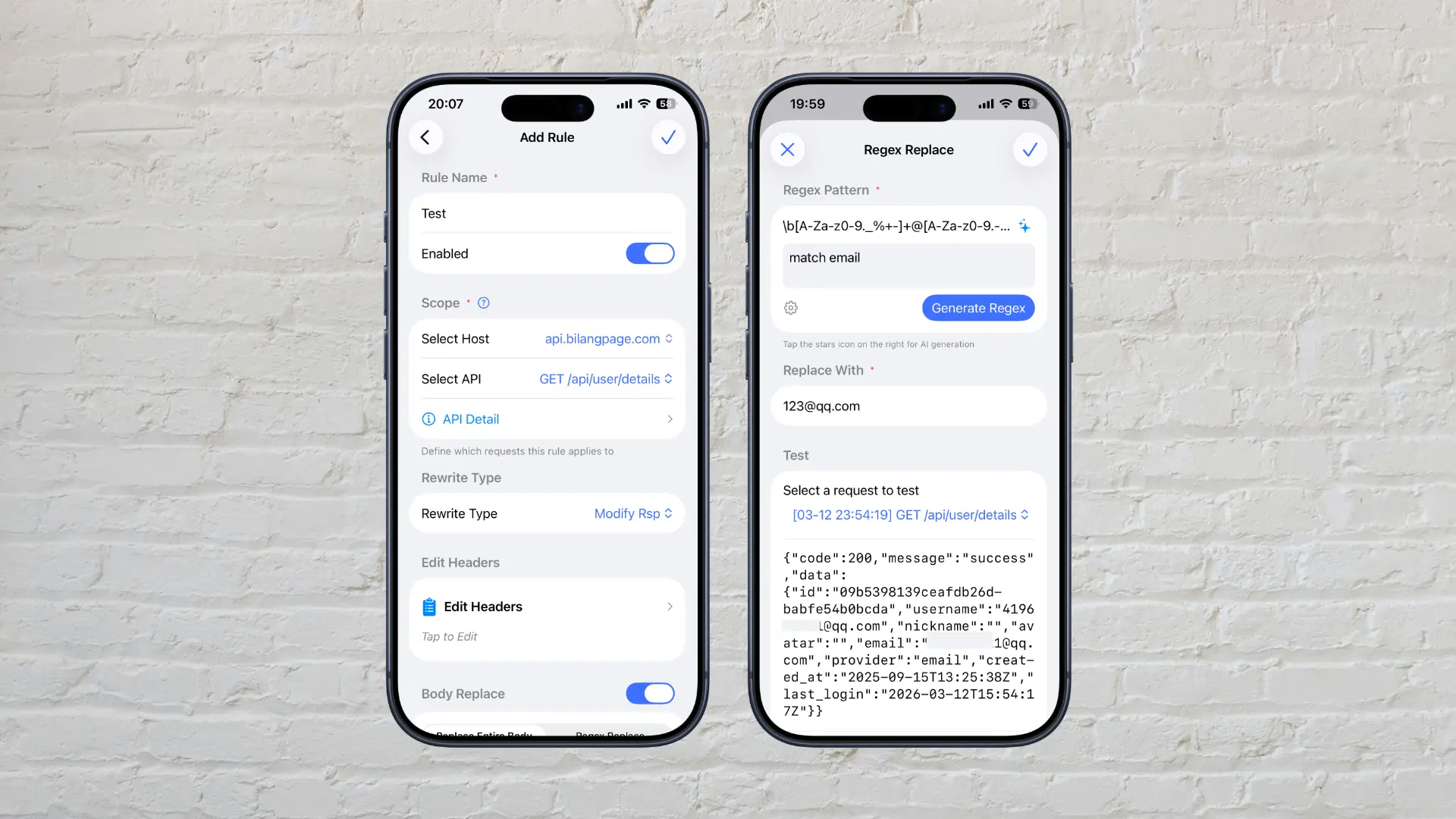
Having the right feature appear at the right moment is where we've focused our efforts on details. We're committed to making ApiCatcher a truly delightful HTTPS debugging proxy that helps you work more efficiently.